Set Up Hermes on Railway With Codex
If you have heard people talk about agents that "run in the background", remember things, use tools, and respond from Telegram or Discord, Hermes Agent is one of those systems.
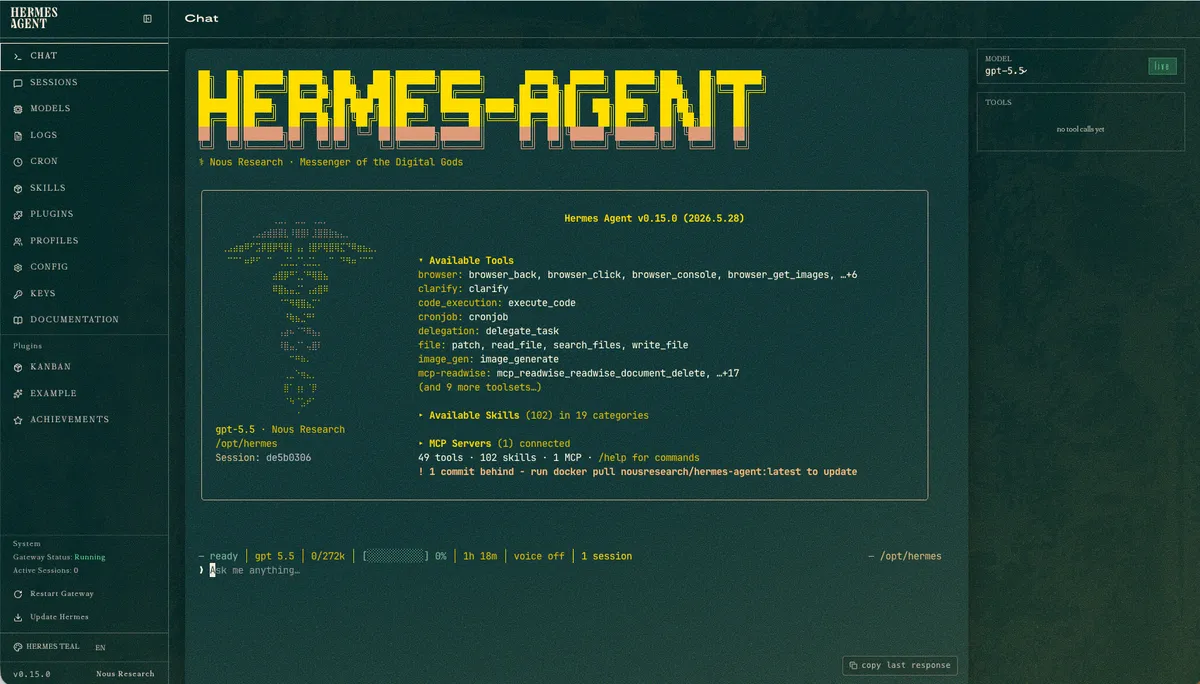
But the first time you try to deploy it, the pieces can feel confusing:
- What is Hermes?
- What is Railway?
- What is a volume?
- Where does memory live?
- What should Codex do?
- What should you never paste into chat?
- How do you move an older Hermes setup without losing memory, skills, sessions, or profiles?
This guide explains it in the simplest useful way.
Think of the setup like a toy train.

Codex is your helper at the workbench. Hermes is the little engine that will keep doing work. Railway is the track and station where that engine runs all day. The volume is the cargo box that carries the important stuff: memory, sessions, skills, settings, and profiles.
The most important rule:
The Hermes container can be replaced.
The Hermes data volume must survive.
If you remember only that, you will avoid most beginner mistakes.
The Simple Mental Model
Hermes Agent has three jobs:
- Listen - receive messages from a dashboard, Telegram, Discord, Slack, or another channel.
- Think and act - call a model, use tools, run tasks, and follow skills.
- Remember - keep useful memory, sessions, skills, cron jobs, and profile state.
Railway has three jobs:
- Run the container - keep Hermes alive on a server.
- Store secrets - keep API keys and tokens out of Git.
- Attach a volume - preserve Hermes state after redeploys.
Codex has three jobs:
- Read the docs and inspect the repo - do not guess.
- Create or update the wrapper - the small files that make Hermes run nicely on Railway.
- Verify the live service - not just "it built", but "it actually works".
The setup looks like this:
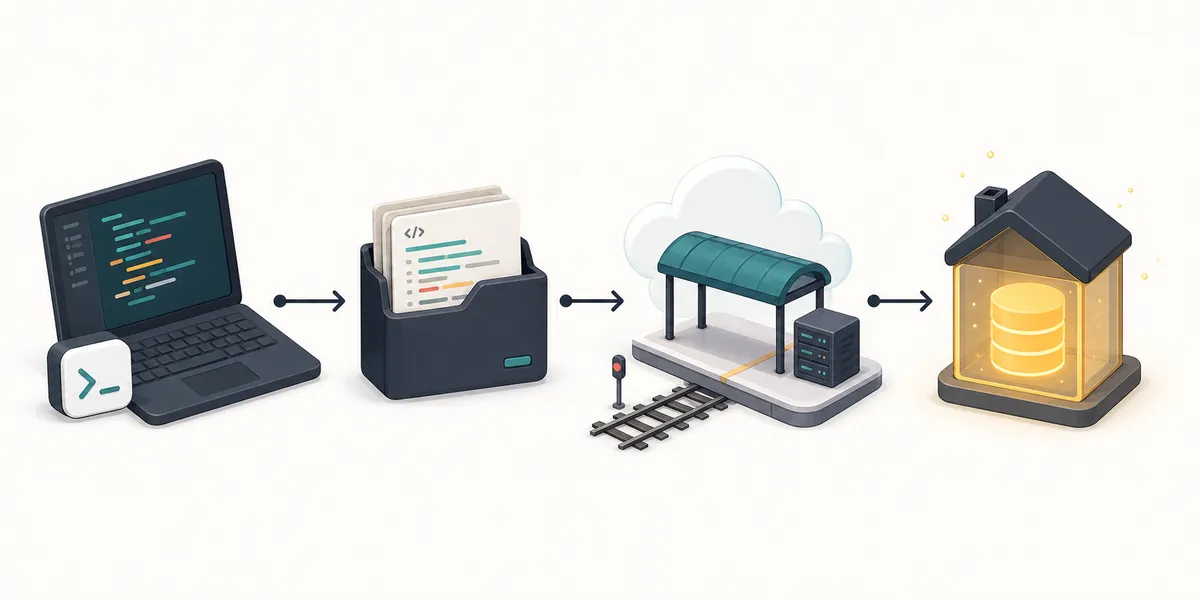
In plain English:
You ask Codex
-> Codex prepares a tiny deployment repo
-> GitHub stores that repo
-> Railway runs it
-> Hermes stores its brain at /opt/data
What You Need Before Starting
You need five things:
- A Railway account.
- A GitHub account.
- Codex running on your machine.
- A model provider key, such as OpenAI or OpenRouter.
- Optional: a messaging channel such as Telegram.
You should also install the Railway CLI if it is not already installed.
Ask Codex:
Check whether the Railway CLI is installed on this machine.
If it is missing, install it using the official Railway instructions for this OS.
Then run railway --version and tell me the installed version.
Do not log in or deploy yet.
Then log in yourself:
railway login
Do not paste Railway tokens, OpenAI keys, Telegram bot tokens, or dashboard passwords into the Codex chat. Use Railway variables or local secret prompts.
Choose Your Deployment Path
There are two sensible paths.
Path A: The Fast Template Path
Railway has template-style deploys. This is the fastest way to try Hermes.
Use it if:
- you are experimenting,
- you do not care about customizing the wrapper yet,
- you want to see Hermes running quickly.
The tradeoff is that you must inspect what the template created. You need to know:
- which image it uses,
- where the volume is mounted,
- whether the dashboard is public,
- where secrets are stored,
- how to update later.
Prompt for Codex:
I want to deploy Hermes Agent on Railway using the template path.
Please inspect the current official Hermes and Railway docs first.
Then tell me:
- which template path is safest for a beginner,
- which variables I need,
- where the volume should be mounted,
- how the dashboard is protected,
- how to verify the live deployment.
Do not ask me to paste secrets into chat.
Path B: The Codex-Managed Wrapper Path
This is the path I recommend if you plan to keep Hermes running.
The idea is simple:
- Use the official Hermes Docker image.
- Add a tiny wrapper so Railway starts Hermes correctly.
- Store Hermes state in
/opt/data. - Keep the dashboard protected.
- Add a health check.
The wrapper repo usually has files like:
Dockerfile
start-railway.sh
dashboard-proxy.mjs
README.md
.gitignore
You do not need to write these by hand. Ask Codex to create them.
Prompt:
Create a minimal Railway wrapper for Hermes Agent.

Requirements:
- Use the official nousresearch/hermes-agent Docker image.
- Keep persistent Hermes state at /opt/data.
- Start Hermes gateway as the long-running Railway process.
- Start the Hermes dashboard only on 127.0.0.1 inside the container.
- Expose Railway public traffic through a small auth proxy.
- Add /__health so Railway can check the service.
- Do not commit secrets.
- Add README instructions for deploy, variables, verification, updates, and rollback.

Before writing files, inspect the current official Hermes Docker docs and Railway volume docs.
After writing files, run syntax checks and show me the file tree.
Why /opt/data Matters So Much
In Docker/Railway setups, the official Hermes state location is commonly treated as:
/opt/data
This folder is the agent's house.
Inside it you may find things like:
.env
config.yaml
SOUL.md
memories/
skills/
sessions/
state.db
cron/
hooks/
profiles/
home/
If Railway rebuilds the container, the container itself can disappear and come back. That is normal.
But if /opt/data is backed by a Railway volume, Hermes can come back with its memory intact.
This is why your first verification should not be "the deploy succeeded."
Your first verification should be:
Is the volume attached at /opt/data?
Ask Codex:
Verify the Railway volume for this Hermes service.
Confirm:
- the volume exists,
- it is attached to the correct service,
- it is mounted at /opt/data,
- HERMES_HOME points to /opt/data,
- the service can write to that path.
Do not print secrets.
The Dashboard Should Not Be Naked On The Internet
Hermes can have a browser dashboard. It is useful, but it should not be publicly exposed without authentication.
The safer shape is:
Internet
-> Railway public URL
-> your auth proxy
-> Hermes dashboard on 127.0.0.1 inside the container
That means the internal dashboard is not directly open to the world.
Ask Codex:
Audit the Hermes dashboard exposure.
I want the public Railway URL to require authentication before reaching the dashboard.
Check:
- whether the dashboard binds to 127.0.0.1 inside the container,
- whether the public URL is protected,
- whether /__health works without exposing private dashboard access,
- whether any route leaks the dashboard without auth.
Do not print secrets.
Good result:
/__health returns 200
/ returns 401 or a login prompt
Bad result:
/ opens the full dashboard with no login
Railway Variables To Expect
The exact variables depend on your provider and channel, but a beginner setup often includes:
HERMES_HOME=/opt/data
HERMES_TIMEZONE=Asia/Singapore
GATEWAY_ALLOW_ALL_USERS=false
DASHBOARD_USERNAME=<set in Railway>
DASHBOARD_PASSWORD=<set in Railway>
Then provider variables, for example:
OPENAI_API_KEY=<set in Railway>
OPENAI_BASE_URL=https://api.openai.com/v1
Or, if you use OpenRouter:
OPENROUTER_API_KEY=<set in Railway>
If you use Telegram, you will also need a bot token and an allowlist or pairing flow.
The safest beginner setting is:
GATEWAY_ALLOW_ALL_USERS=false
Do not set it to true casually. Hermes can run tools. Unknown users should not be able to control it.
Prompt:
Create a Railway variable checklist for this Hermes setup.
Split it into:
1. safe non-secret variables,
2. secret variables I must enter directly in Railway,
3. optional Telegram or Discord variables,
4. debugging variables.
Do not ask me to paste secret values.
Deploy It
Once the wrapper repo is ready, ask Codex to deploy.
Prompt:
Deploy this Hermes wrapper to Railway.

Before deploying:
- resolve the real git repo root,
- show the current branch and dirty files,
- confirm no secrets are staged,
- confirm the Railway project and service target,
- confirm the volume mount path should be /opt/data.

Then deploy and verify:
- Railway service status,
- deployment status,
- volume attachment,
- public /__health,
- Hermes version inside the container,
- gateway status inside the container,
- dashboard auth behavior.

Do not print secrets or raw environment dumps.
Codex may run commands like:
railway link
railway volume add --mount-path /opt/data
railway up --detach --path-as-root
The exact commands can change by Railway CLI version. Let Codex inspect railway --help instead of blindly copying old commands.
Verify Like A Grown-Up, Even If You Are A Beginner
Do not stop when Railway says "deployed."
You want proof that the real service works.
Ask Codex:
Verify the live Hermes Railway service.

Required checks:
- Railway service status is successful and not stopped.
- Railway volume is attached at /opt/data.
- Public /__health returns 200.
- Public dashboard route requires auth.
- Hermes reports its version from inside the container.
- Hermes gateway status reports running.
- Logs show the gateway started.
- Logs do not show an obvious crash loop.
- No secret values are printed.

Summarize pass/fail with exact commands used.
Typical checks include:
railway service status --json
railway volume list --json
curl -fsS https://YOUR-RAILWAY-DOMAIN/__health
railway ssh /opt/hermes/.venv/bin/hermes --version
railway ssh /opt/hermes/.venv/bin/hermes gateway status
railway logs --lines 100
After that, send one real message through the dashboard or Telegram and ask Codex to inspect logs.
Prompt:
I sent a test message to Hermes.
Check the Railway logs and confirm whether Hermes received the message, completed the turn, and avoided obvious errors.
Do not print private message content or secrets.
Common Beginner Failures
The service starts and exits
Usually the container started an interactive CLI instead of the gateway.
Ask Codex:
The Railway service starts and exits.
Inspect the Dockerfile, start command, and logs.
Fix the wrapper so Hermes gateway runs as the foreground long-running process.
Then redeploy and verify service status.
Hermes forgets everything after redeploy
Usually the volume is missing or mounted in the wrong place.
Ask Codex:
Hermes seems to forget state after redeploy.
Check whether the Railway volume exists, which service it is attached to, and whether it is mounted at /opt/data.
Then check HERMES_HOME from inside the container without printing secrets.
Give me the smallest safe fix.
The dashboard is public
That is a security problem.
Ask Codex:
Audit the dashboard exposure.
I want the Hermes dashboard reachable from Railway only through an auth layer.
Check public behavior with curl, inspect the wrapper, and fix any path that exposes the dashboard directly.
Telegram has a polling conflict
Usually two services are using the same bot token.
Ask Codex:
Hermes logs show a Telegram polling conflict.
Find whether more than one Railway service is using the same bot token without printing the token.
Recommend the safest cutover path.
Do not stop anything until I confirm which service is old.
Bonus: Migrate Memory, Skills, Sessions, And Profiles
Migration means moving the old Hermes house into the new Hermes house.

Your old setup might be:
- local
~/.hermes, - an older Railway service,
- a VPS,
- a Docker volume,
- a community template that used a path like
/data/.hermes.
Your new Railway setup should use:
/opt/data
The basic migration flow:
inventory old setup
-> back up old setup
-> back up new setup
-> stop or pause writes on the new setup
-> copy old state into /opt/data
-> rewrite old absolute paths if needed
-> remove stale lock files
-> restart Hermes
-> verify everything
-> only then stop the old service
Ask Codex:
I want to migrate an existing Hermes setup into this Railway service.

Source:
- <local ~/.hermes OR old remote service/path>

Target:
- Railway service <project/service>
- Hermes home /opt/data

Please:
1. Inspect source structure without printing secrets.
2. Identify memory, USER profile, SOUL.md, skills, sessions, state.db, cron jobs, hooks, profiles, auth files, and home credential files.
3. Create a migration plan with rollback.
4. Put the target into migration mode or stop writes if needed.
5. Back up the target first.
6. Copy source to target.
7. Rewrite old absolute paths if the source path differs.
8. Remove stale lock, PID, WAL, and SHM files.
9. Restart target.
10. Verify version, gateway, dashboard, memory files, skills, sessions, cron jobs, profiles, and one real message.

Do not print secrets.
Do not stop the old service until target verification passes.
If You Only Want Memory
Copy:
memories/MEMORY.md
memories/USER.md
Prompt:
Migrate only Hermes memory from the old setup to the new setup.
Copy MEMORY.md and USER.md into /opt/data/memories/.
Back up the target versions first.
Do not change sessions, skills, cron jobs, provider keys, or auth files.
Then tell me whether I need a fresh Hermes session for the memory to load.
If You Only Want Skills
Copy:
skills/
Prompt:
Migrate only custom Hermes skills from the old setup to the new setup.
Compare old skills and target skills.
Preserve bundled target skills unless a custom skill intentionally overrides one.
Back up the target skills folder first.
Do not migrate provider keys, sessions, or auth state.
After restore, list installed skills and identify which are custom.
If You Only Want Personality
Copy:
SOUL.md
Prompt:
Migrate only SOUL.md from the old Hermes setup to the new setup.
Back up the target SOUL.md first.
Do not migrate memory, skills, sessions, provider keys, or auth files.
After restore, start a fresh Hermes session and verify the identity changed.
If You Have Multiple Profiles
For local use, Hermes profiles are convenient.
For Railway, the simpler operational model is usually:
one Railway service + one Railway volume = one Hermes profile
That means:
personal Hermes -> railway service A -> volume A
work Hermes     -> railway service B -> volume B
This avoids two profiles fighting over the same gateway, cron jobs, bot token, or database.
Prompt:
I have multiple Hermes profiles and want to run them on Railway.
Inspect the profile layout and recommend whether to:
1. keep built-in profiles inside one Hermes home, or
2. split each profile into its own Railway service and volume.

Prefer operational safety over cleverness.
Explain migration steps, cost/resource impact, channel-token conflicts, and rollback.
Backup Before You Touch Anything Important
Before a big update or migration, ask for a backup plan.
Prompt:
Create a safe backup plan for the Hermes Railway volume before migration.
The Hermes home is /opt/data.
Use railway ssh if appropriate.
Use a SQLite-safe backup for state.db if it exists.
Exclude stale lock and PID files.
Create a checksum.
Do not print secrets.
Do not stop the old service until the backup is verified.
Files to protect:
.env
auth.json
config.yaml
SOUL.md
memories/
skills/
sessions/
state.db
cron/
hooks/
profiles/
home/
Files usually safe to exclude from migration:
*.lock
*.pid
state.db-wal
state.db-shm
cache/
tmp/
Do not delete logs if you need them for audit or debugging.
Do Not Confuse Hermes State With Codex State
Hermes and Codex are different.
Hermes state is usually:
~/.hermes
/opt/data
Codex state may include:
~/.codex
~/.agents
AGENTS.md
.codex/
skills/
plugins/
MCP config
If you also want to migrate Codex skills, memories, or profiles from another machine, treat that as a separate migration.
Prompt:
Separately audit my Codex setup for migration.
Look for AGENTS.md files, ~/.codex config, ~/.codex/skills, ~/.agents, plugins, hooks, MCP config, and project-local .codex folders.
Create a migration report before changing anything.
Do not copy auth tokens blindly.
Do not print secrets.
The Final End-To-End Prompt
If you want Codex to drive the whole setup, start with this:
Help me set up Hermes Agent on Railway end to end.

I am a beginner, so explain decisions plainly, but execute once the plan is clear.

Use current official Hermes and Railway docs.
Prefer the official nousresearch/hermes-agent Docker image.
Create a small Railway wrapper only if needed.
Mount persistent state at /opt/data.
Keep the dashboard protected behind auth.
Use Railway variables for secrets.
Do not print secrets.
Do not commit .env files.
Use GitHub for the wrapper repo.
Deploy to Railway.
Verify the real live service with Railway status, logs, volume attachment, /__health, Hermes version, gateway status, dashboard auth behavior, and one real message test.
Write a README and rollback notes.

Bonus:
If I already have an old Hermes setup, inventory it and make a migration plan for memory, USER profile, SOUL.md, skills, sessions, state.db, cron jobs, hooks, profiles, and auth state.
Do not migrate until the backup and rollback plan are clear.
Final Checklist
Before you call your Hermes setup done, make sure:
- Railway service is running.
- Volume is mounted at
/opt/data. HERMES_HOMEpoints to/opt/data.- Dashboard is not public without auth.
- Unknown users cannot control the agent.
- Provider keys are not committed to Git.
- One real message test works.
- Backups exist before migration.
- Old services are stopped after cutover.
- Codex did not print secrets.
Final mental model:
Hermes is the agent.
Railway is the always-on machine.
/opt/data is the memory and state.
Codex is the implementation partner.
GitHub is the wrapper source of truth.
The dashboard must not be public without auth.
Old services must not keep running the same bot token after migration.
Sources checked on 30 May 2026:
- Hermes Agent docs: https://hermes-agent.nousresearch.com/docs/
- Hermes Docker guide: https://hermes-agent.nousresearch.com/docs/user-guide/docker
- Hermes memory docs: https://hermes-agent.nousresearch.com/docs/user-guide/features/memory
- Hermes skills docs: https://hermes-agent.nousresearch.com/docs/user-guide/features/skills
- Hermes profiles docs: https://hermes-agent.nousresearch.com/docs/user-guide/profiles/
- Hermes security docs: https://hermes-agent.nousresearch.com/docs/user-guide/security
- Railway services: https://docs.railway.com/services
- Railway deploys: https://docs.railway.com/cli/deploying
- Railway volumes: https://docs.railway.com/volumes/reference