Description Engineering: The Hidden Prompt in Your API Documentation
Your API documentation isn't just documentation anymore—it's a prompt.
When LLMs consume your API via function calling or tools, every description field in your OpenAPI spec or JSON Schema gets injected directly into the model's context. That terse, one-word parameter name q? The model doesn't know if it wants a keyword, a natural language question, or a SQL query. That missing example in your date field? The model will hallucinate "tomorrow" instead of "2024-01-15".
Description Engineering is the practice of treating your API documentation as first-class prompt engineering. It means:
- Be imperative: "Returns the user ID" beats "The user ID"
- Define formats explicitly: State
YYYY-MM-DD, don't assume - **Explain when, not just *what***: "Use this tool only after authentication"
- Provide examples: Show
proj_123xyzso the model can pattern-match from conversation history
The ROI is massive. Teams report accuracy jumps from 60% to 95% just by rewriting descriptions and flattening payloads. In an agentic world, your API schema is your UX. Engineer it accordingly.
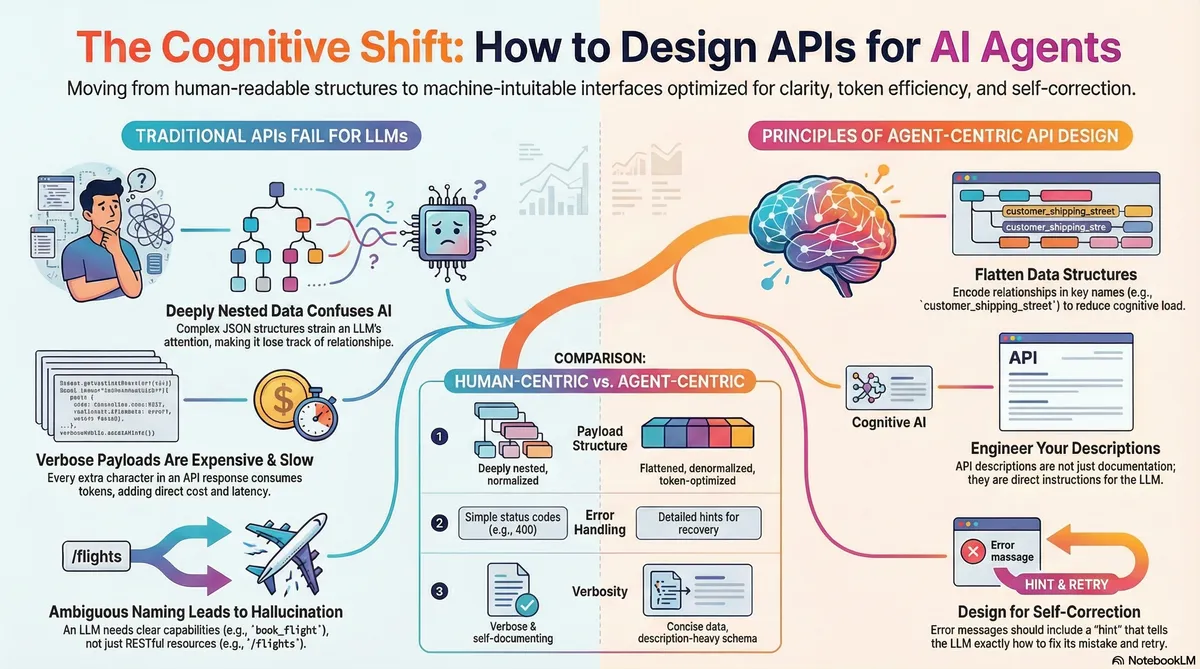
The Paradigm Nobody Saw Coming
For two decades, we designed APIs for two consumers: human developers reading documentation, and machines executing deterministic calls. RESTful purity. Nested JSON hierarchies. Self-documenting HATEOAS links.
Then LLMs started calling our APIs.
Not browsing. Not exploring. Calling—through a mechanism closer to RPC than REST. And suddenly, every assumption we made about good API design became a liability.
Here's the uncomfortable truth: LLMs don't read your API documentation the way humans do. They consume it as context. Your OpenAPI spec gets serialized into their prompt. Every field, every description, every example becomes tokens that compete for attention in a fixed-size window.
And this changes everything.
Your Documentation Is the Prompt
In traditional API design, the description field is an afterthought. Metadata for the docs portal. Something the new hire writes during onboarding.
In LLM-facing APIs, the description field is a direct instruction to the model.
When you define a tool for Claude or GPT-4, here's what happens:
- Your JSON Schema (including all descriptions) gets injected into the system prompt
- The model reasons about user intent against your schema
- It generates a structured tool call based on what you told it the tool does
If your description is vague, the model hallucinates. If it's missing, the model guesses. If it's wrong, the model confidently does the wrong thing.
This is why I call it Description Engineering—because writing good descriptions is now as critical as writing good code.
The Anatomy of a Bad Schema
Let's examine a real anti-pattern:
{
  "name": "search",
  "parameters": {
    "type": "object",
    "properties": {
      "q": {"type": "string"}
    }
  }
}
What's wrong here?
qis semantically null. The model doesn't know if this is a keyword, a natural language question, a regex, or a SQL fragment.- No description. The model has zero guidance on what to put in this field.
- No examples. The model can't pattern-match against known-good inputs.
- No context. When should this tool be used? For what kind of queries?
The model will make something up. Sometimes it'll work. Often it won't. And you'll blame "the AI" when the real problem was your schema.
The Anatomy of a Good Schema
Now compare this:
{
  "name": "search_knowledge_base",
  "description": "Semantic search over the internal documentation. Use this to find policy details, troubleshooting guides, and HR procedures.",
  "parameters": {
    "type": "object",
    "properties": {
      "query_text": {
        "type": "string",
        "description": "Natural language query describing the information to retrieve. Example: 'How do I reset 2FA?' or 'What is the PTO policy for contractors?'"
      },
      "category_filter": {
        "type": "string",
        "enum": ["billing", "technical", "hr", "security"],
        "description": "Optional filter to narrow search scope. Omit for broad search."
      }
    },
    "required": ["query_text"],
    "additionalProperties": false
  },
  "strict": true
}
Every element is doing work:
| Element | Purpose |
|---|---|
| Descriptive tool name | Tells the model what this does at a glance |
| Tool-level description | Explains when to use it and what kind of data it returns |
| Parameter names | Semantically meaningful (query_text vs q) |
| Parameter descriptions | Format expectations + concrete examples |
| Enums | Constrain the search space, prevent hallucination |
strict: true |
Forces exact schema conformance |
This is description engineering. Every string is a micro-prompt.
Five Principles of Description Engineering
1. Be Imperative, Not Declarative
- ❌ "The user ID"
- ✅ "Returns the unique identifier for the authenticated user"
Imperative descriptions tell the model what to do with the information. Declarative descriptions just label things.
2. Define Formats Explicitly
- ❌
"date": {"type": "string"} - ✅
"date": {"type": "string", "description": "Date in ISO 8601 format (YYYY-MM-DD). Example: 2024-01-15"}
LLMs are trained on the entire internet. They've seen dates formatted a thousand different ways. If you don't specify, they'll pick one at random—and it probably won't be the one your API expects.
**3. Explain When, Not Just *What***
- ❌ "Creates a refund"
- ✅ "Creates a refund for a completed order. Use this only after confirming the order status is 'delivered' or 'cancelled'. Requires order_id from a previous get_order call."
The model needs to understand the preconditions and workflow context. Otherwise, it'll call your refund endpoint on an order that's still in transit.
4. Provide Pattern-Matchable Examples
- ❌
"project_id": {"type": "string"} - ✅
"project_id": {"type": "string", "description": "The unique project identifier. Format: 'proj_' followed by 12 alphanumeric characters. Example: 'proj_a3b2c1d4e5f6'"}
When users say "use the project from earlier," the model needs to regex-match that ID from conversation history. Giving it the pattern makes this reliable.
5. Use Enums Aggressively
Enums are constraints. Every enum you add is one less dimension of hallucination.
"status": {
  "type": "string",
  "enum": ["pending", "active", "closed", "archived"],
  "description": "Filter results by status. Use 'active' for current items."
}
With strict mode enabled, the model cannot output anything outside this list. That's not a limitation—it's a feature.
The Deep Nesting Tax
There's another dimension to this: structure.
LLMs use transformer architectures that rely on attention mechanisms. Every token attends to every other token, but attention fades with distance—especially in deeply nested structures.
Consider this JSON:
{
  "order": {
    "id": "123",
    "customer": {
      "profile": {
        "shipping_address": {
          "street": "Main St"
        }
      }
    }
  }
}
To extract street, the model must maintain attention across: order → customer → profile → shipping_address → street. That's five levels of scope tracking.
Research shows that as nesting depth increases, models suffer from:
- Attention dilution: Important relationships get lost in the noise
- Scope collapse: The model loses track of which closing brace matches which opening brace
- Token waste: Every
{,}, and level of indentation consumes tokens
The fix is flattening:
{
  "order_id": "123",
  "customer_shipping_street": "Main St",
  "customer_shipping_city": "New York"
}
The semantic relationship is now encoded in the key name itself. The model doesn't need long-range attention—the dependency is local to a single token.
Error Messages as Prompts
Description engineering extends to your error responses.
Traditional API:
HTTP 400: Invalid Input
What does the model do with this? Retry with the same input. Hallucinate a different format. Give up.
Agent-ready API:
{
  "error": {
    "code": "invalid_date_format",
    "message": "The 'start_date' parameter must be in ISO 8601 format (YYYY-MM-DD). You provided 'tomorrow'.",
    "hint": "Calculate the date for tomorrow relative to the current date (2024-01-15) and retry."
  }
}
Now the model can:
- Understand what went wrong (format, not value)
- Know exactly what format you expect (ISO 8601)
- See what it actually sent ('tomorrow')
- Get a specific instruction for how to fix it
This is the self-correction loop. Your error messages are prompts that teach the model how to recover.
The ROI of Description Engineering
This isn't theoretical. Teams implementing these principles report:
- Accuracy improvements from 60% to 95% on agent-driven workflows
- Token usage drops of 80-90% from flattening and payload projection
- Dramatic reduction in "hallucinated tool calls" via strict schemas and enums
- Faster debugging because error messages are actionable
The investment is low. The payoff compounds with every agent interaction.
Practical Next Steps
Audit your critical APIs. Look for:
- Missing or one-word descriptions
- Unspecified date/time formats
- String fields that should be enums
- Deeply nested response objects (3+ levels)
- Generic error messages
Rewrite one schema today. Pick your most-used tool. Apply the five principles. Measure the difference.
Adopt strict mode. If your LLM provider supports structured outputs, use it. The constraint is the feature.
Flatten your payloads. Create LLM-specific response projections that denormalize nested data into flat key-value pairs.
Treat errors as teaching moments. Every error message should contain enough context for the model to self-correct.
The Bigger Picture
We're living through a phase transition in software architecture. For thirty years, the interface between systems was designed for deterministic machines or reading humans. Now there's a third consumer: the probabilistic reasoning engine.
These engines don't need beautiful docs portals. They don't care about your resource hierarchy. They need semantic clarity, constrained outputs, and actionable feedback.
Description engineering is how we meet them where they are.
Your API documentation was always important. Now it's also a prompt.
Engineer it accordingly.
Related concepts: Cognitive-First API Design, Model Context Protocol (MCP), JSON Schema for Tool Use, Agentic Interfaces